Release 1.6.3 Highlights
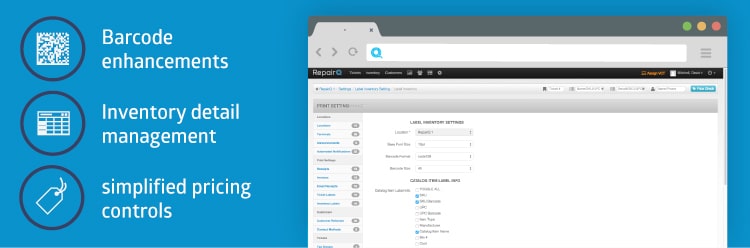
Barcode Enhancements
Inventory Detail and Process Management
Inventory Search ®“ Context Switching
Simplified Pricing Controls for Inventory
Purchase Order Improvements (Round 1 of 2)
Repair Device Intake ®“ improve efficiency
1.6.2 release notes:
RepairQ 1.6.3 release is now live!
RepairQ is capable of printing inventory labels with barcodes to improve accuracy and increase efficiency throughout various sales and inventory management tasks. Previously RepairQ only supported Code39 barcode format. This became problematic when trying to print barcodes for lengthy Serial Numbers and UPC codes because either (a) the barcode would not fit entirely on a small label or (b) the barcode would be so small that the barcode scanner could not read it. To be more flexible, RepairQ now supports several additional barcode formats. If you are printing lengthy barcodes on small labels then we recommend that you use Code128 barcode format rather than Code39 as Code128 is more sparse than Code39 and it can fit lengthy barcodes into a much smaller space than Code39. Support for Code128 is very common, and chances are that your barcode scanner is already capable of reading it. Datamatrix labels are square and more capable of fitting more information into a smaller space. If you need to use very small labels, then this format could be your best option. To change which barcode format is used, the administrator should navigate to the print settings for inventory labels and choose the desired barcode format from the list of available options.
Supported Barcode Formats: - Code39 (the RepairQ default)
- Code93
- Code128
- Datamatrix
This view lists individual inventory items rather than grouping by catalog item. The intention behind creating this view was to give users a way to edit inventory items across multiple catalog items. There are some processes/workflows in particular where this screen gives you the tools you need to perform the updates necessary in an efficient manner. For example, processing “Pending RMA® items used to be really difficult to do in RepairQ because in most cases you process RMAs by supplier and status, but in RepairQ (before this feature) you could only edit items one catalog item at a time. There are a number of “Inventory Focus® filters that are intended to give you the ability to drill down on all items related to a particular process in RepairQ that handles inventory in a transient status (i.e. not “instock® and not a terminal status).
The global inventory search (partial and exact) should reset the inventory filters that are stored in the session from previous searches in order to return results specific to the global search query.
Currently the retail price for each item is stored at the inventory item level. This allows the flexibility to charge a different price for individual like items based on various conditions such as purchase price, condition, market value, etc. This flexibility is necessary for selling refurbished phones and other devices, but it becomes difficult to control the uniformity of pricing on parts and accessories where individual pricing is not needed. It is now possible to choose whether an item will have variable pricing or uniform pricing in the item type settings. Items that have uniform pricing will have a single price per catalog item which is defined in the global catalog or the location specific catalog. Items that have variable pricing will continue to have a price per individual inventory item.
Total Quantity and Amount Rather than showing only ordered quantity and amount, the Purchase Order will now also show the received quantity and amount as a separate total.This will allow the management and accounting staff to track actual cost vs ordered cost in order to improve reconciliation of purchases in the company’s accounting system.
Label Printing Efficiencies Prior to receiving a purchase order, the user will have the option to print labels for the items on the purchase order. Efficiency can be gained by printing all labels on a PO and affixing the labels while counting the items, rather than counting the items first, entering the number received, receiving the PO and finally printing off labels.
Backorder Reference List On the PO there is a section that lists backordered tickets being fulfilled. To eliminate unnecessary steps for cross-referencing data additional information will be displayed on the backorder list, including: catalog item name, ticket status, and promised date/time.
Editable Notes Field The purchase order note field will remain editable until the PO is fully reconciled. The note field will also be editable from the ship screen. This will allow the staff to enter notes to facilitate communication throughout the purchase or transfer process.
When adding a repair device to a ticket, it used to be required to click a “continue® button to validate and save the repair device section of the ticket. After this update you will be able to continue working with the ticket as soon as you enter diagnostics for the new repair device. Validation happens silently, and for additional convenience the cursor focus is set on the diagnostics field immediately after adding a new device to the ticket. We hope these seemingly small updates have a positive impact on the efficiency of repair device intake by reducing the number of clicks and amount of scrolling required to enter the required information.
Other minor updates and fixes. For more info, see notes below: Bug #4103: Automated Notification ®“ Ticket Promised by Date Shortcode Bug #4165: Inventory Item ®” Save Redirection ®” Special Order Parts Bug #4170: Customer ®“ Balance Adjustment ®“ Multiple Balance adjustments Bug #4189: Ticket ®“ Edit Customer ®“ Error For Editing Customer Loyalty Card Field Bug #4192: Excel formatting of numerical SKU Bug #4195: Internal PO/Transfer ®“ need to be able to designate serial numbers when preparing shipments Bug #4196: Update filter resets Bug #4214: The global inventory searches should reset the other inventory filters Bug #4225: Inventory transfer “order® dates getting set to blank Feature #4083: Purchase Order ®“ print labels while in any status Feature #4141: PO ®“ add details to backordered items fulfilled section Feature #4144: Revenue Report ®“ Add location name and staff member Feature #4147: Print Settings ®“ barcode format Feature #4156: Purchase Order Note ®“ make editable in all non-reconciled statuses Feature #4197: Move inventory pricing to catalog Feature #4204: Inventory Detail List Feature #4213: Purchase Order View should show received qty and dollar value Feature #4215: The continue button on repair devices should be easier to find





 Our website uses cookies as further described in our