
Several performance optimizations for the inventory list/search screen were released in RepairQ 1.6.1. Along with these optimizations we included some tweaks and changes that we have wanted to do for awhile now, most of which were aimed at bringing more clarity to the inventory list. In the process, we inadvertently removed some functionality that many of you expressed to us saved you time and effort involved in inventory management. To remedy this, we have been working furiously over the past week to restore this functionality without losing the new performance gains in the process. Over the weekend we released an update that we feel gets us there.
Functionality brought back by popular demand:
All inventoried catalog items that are defined as active are displayed by default. This means that no extra clicks are required to see items that are out of stock (setting filters), and it also means there are no extra clicks to see items that have never before been stocked. 
New features:
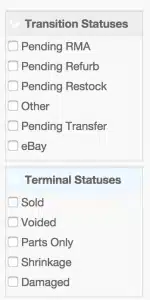 Inventory statuses are broken out by “transition® and “terminal® as a visual segmentation of live inventory vs terminal inventory. Terminal inventory items are items that were once in “live® or “on hand® inventory, but now only exist in your system for historical records. Inventory items “in transition® are in the live inventory, but are not available for sale until they later transition to “instock® status.
- Now when you filter for one or more inventory statuses you will get a count of the selected statuses. For example, in the past there was no way to get a total count of items in the “pending RMA® or “pending restock® status on the main inventory screen, but now you can see those quantities when you filter for those statuses.
- When viewing inventory across multiple locations that have different re-order points, a min/max range is displayed, rather than a sum total of all location reorder points.

Optimization updates:
We included another round of optimization, which brings some of the biggest gains with it. Before this update, In some cases if you decided to view or search within all inventory items (live and terminal) across multiple locations it could take anywhere from 10 to 60 seconds to load the results (60 seconds for a large multi-store database). In addition to the sluggish response time on those large data-sets, there were intermittent reports of scripts exceeding the configured memory limit and being terminated by the server, therefore returning an error rather than the requested results. After this update the load time was reduced from 60 seconds (in the above large multi-store database) to approximately 4 seconds, and now the more common inventory searches load in 1 to 2 seconds or less! We expect everyone will see a massive improvement in the speed when working with the main inventory screen. We are careful not to release anything that will cause problems with your RepairQ installation, but if you feel that we have messed something up then please submit a support ticket and we will resolve the issue ASAP. 



 Our website uses cookies as further described in our